CD Player for Apple Music
Updated October 2, 2026 · Marquee Features
In short
Marquee’s CD player style turns Now Playing into a CD player app for Apple Music: your album art is printed on a compact disc that spins in a minimal matte deck, with a time display and hardware-style keys. It’s one of eight player styles in Marquee, a free Apple Music player for iPhone and iPad, and it’s part of Marquee Pro.
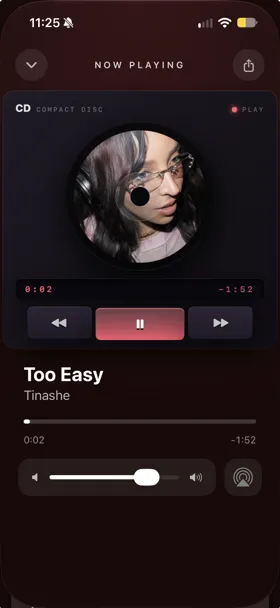
A CD player app for your Apple Music
Marquee’s CD style is modeled on a minimal hi-fi deck. Your album art is printed on the disc, which sits in a recessed well with an iridescent sheen and a frosted hub, and it spins while the song plays. Pause and it stops right where it is; press play and it picks up from the same spot.
Below the disc, a dark time display shows elapsed and remaining time, and three flat keys skip back, play or pause, and skip forward. The play key is filled with your theme’s accent color and stays pressed in while music plays, like the mechanical play key on a real deck. A PLAY light glows in the same color. You can also tap the disc to play or pause.
It’s the same Apple Music library and catalog you already use. On iPad, the deck sits beside the controls in landscape, like all eight of Marquee’s player styles.
A spinning CD on your home screen
Marquee’s CD Player widget puts the disc on your home screen. It spins while music plays and rests when you pause, and the larger sizes add previous, play/pause, and next buttons. The animation is drawn by the same system mechanism that renders the Home Screen clock, so it won’t drain your battery. It comes in small, medium, and large, plus extra-large on iOS 27. See the whole set on the animated music widgets page.
Share a spinning CD
Tap the share button in the player and Marquee turns the current song into a story-ready video of your album art on a spinning disc, with the song title and artist. It goes to the share sheet, so it works with Instagram Stories and any app that accepts video. Sharing is free. See how to share Apple Music to your Instagram story.
Still have the real CDs?
Point Marquee’s free barcode scanner at a CD case and it jumps straight to that album in Apple Music, so you can add your CDs to Apple Music and play them in the CD style.
How to turn on the CD player
- Download Marquee free from the App Store and allow access to Apple Music.
- Go to the Customize tab and pick the CD player style. Styles beyond Classic are part of Marquee Pro, which starts with a free trial.
- Play something and open Now Playing to watch the disc spin.

Try it with Marquee — free
The Apple Music player with eight player styles, animated widgets, themes, and Last.fm scrobbling. Requires an Apple Music subscription.
Frequently asked questions
Is the CD player free?
The Classic player is free. CD and the other player styles — Full-Screen, Vinyl, Cassette, Equalizer, Marquee, and Retro — are part of Marquee Pro, which you can try free. Sharing a spinning CD video is free.
Does the CD widget spin?
Yes. With Marquee Pro, the CD Player widget spins while music plays and rests when playback pauses, without draining your battery.
Does the CD style work on iPad?
Yes. All eight player styles, including CD, have landscape layouts on iPad.