Animated Music Widgets for iPhone
Updated October 2, 2026 · Marquee Features
In short
Marquee’s deck widgets animate on your iPhone home screen while Apple Music plays: a vinyl record spins, cassette reels wind, album art dances as equalizer bars, a CD spins, and golden bulbs chase around your album art. They pause when your music pauses and are part of Marquee Pro.
Five animated music widgets
Most music widgets are a static square of album art. Marquee’s deck widgets move while your music plays:
- Vinyl — a record that spins. Pair it with the Vinyl player.
- Cassette — reels that wind as the tape plays. Pair it with the Cassette player.
- Equalizer — your album art dancing as equalizer bars. Pair it with the Equalizer player.
- CD — a compact disc that spins. Pair it with the CD player.
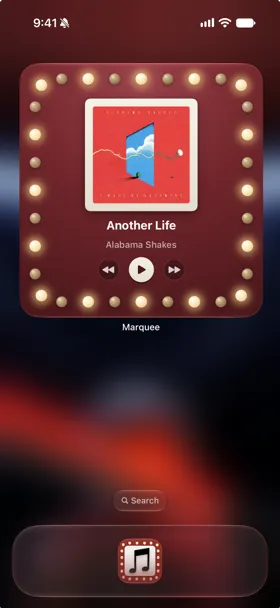
- Marquee — the app icon come to life, with golden bulbs chasing around your album art.
All of them pause when your music pauses and follow the theme you choose in Marquee, so your widgets, player, and app icon match.
Animated without draining your battery
The animation is drawn by the same system mechanism that renders the Home Screen clock, built on native WidgetKit timelines, so no app code runs while a widget animates. They also stay legible in tinted and clear home screen modes.
Every size, on iPhone and iPad
The widgets come in small, medium, and large on iPhone and iPad, and on iOS 27 every Marquee widget adds the new extra-large size. Alongside the animated decks, Marquee has a Music Player widget with play/pause and skip controls, a Retro Player widget with working wheel controls, lock screen widgets, a City Charts widget with the top 25 songs in your city, and an Upcoming Releases widget that counts down to release day.
How to add an animated music widget
- Download Marquee free from the App Store and connect Apple Music.
- Long-press an empty area of your home screen, tap Edit, then Add Widget.
- Search for “Marquee,” pick a deck widget and a size, and tap Add Widget.
- Play some music and watch it move. Animated deck widgets are part of Marquee Pro.

Try it with Marquee — free
The Apple Music player with eight player styles, animated widgets, themes, and Last.fm scrobbling. Requires an Apple Music subscription.
Frequently asked questions
Is there a music player widget with controls?
Yes. Marquee’s Music Player widget shows what’s playing in Apple Music with play/pause on every size and skip on medium and large, and it comes free with Marquee. The animated deck widgets are part of Marquee Pro.
Do the widgets really animate?
Yes. The deck widgets animate while music plays and pause when playback pauses. Animated deck widgets are part of Marquee Pro.
Do animated widgets drain the battery?
No. The animation is drawn by the same system mechanism that renders the Home Screen clock, so no app code runs while a widget animates.
What sizes do the widgets come in?
Small, medium, and large on iPhone and iPad. On iOS 27, every Marquee widget also comes in the new extra-large size.
Do the widgets control playback?
The Music Player widget does: play and pause from every size, and skip on medium and large.