Vinyl Music Player for Apple Music
Updated September 28, 2026 · Marquee Features
In short
Marquee is a vinyl music player for Apple Music. Its Vinyl player style turns the Now Playing screen into a turntable, and your album spins like a record while it plays. It’s one of eight player styles in Marquee, a free Apple Music player for iPhone and iPad that also runs on Macs with Apple silicon, and it’s part of Marquee Pro.
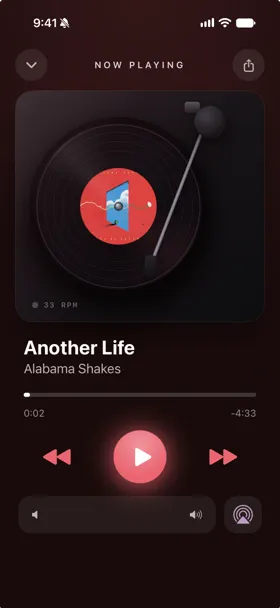
A record player app for your Apple Music library
Apple’s Music app has one Now Playing screen. Marquee has eight, and Vinyl is the one for anyone who grew up with records or still buys them: your album spins on a turntable for as long as the music plays. It works with your real Apple Music library — the same songs, playlists, and catalog — so there’s nothing to import. Comparing record player apps? See how Marquee stacks up as an MD Vinyl alternative.
On iPad, the Vinyl style has its own landscape layout, like all eight of Marquee’s player styles.
A vinyl music player on your Mac
Marquee’s iPad app runs on Macs with an Apple M1 chip or later and macOS 26 or later, so you can put the turntable on your desktop too. In the Mac App Store, search for Marquee and look under iPhone & iPad Apps. It’s the same app as on iPad, so there’s nothing extra to buy.
A vinyl widget that actually spins
Take the turntable to your home screen. Marquee’s animated vinyl deck widget spins the record while music plays and pauses when your music pauses. The animation is drawn by the same system mechanism that renders the Home Screen clock, so no app code runs while it animates and it won’t drain your battery. See all of them on the animated music widgets page.
Share it as a spinning record
Tap the share button in the player and Marquee turns the current song into a story-ready video built around the album artwork, including a spinning vinyl record. It goes straight to the share sheet, so it works with Instagram Stories and any app that accepts video. Sharing is free.
How to turn on the Vinyl player
- Download Marquee free from the App Store and allow access to Apple Music.
- Go to the Customize tab and pick the Vinyl player style. Styles beyond Classic are part of Marquee Pro, which starts with a free trial.
- Play any song, album, or playlist and open Now Playing.

Try it with Marquee — free
The Apple Music player with eight player styles, animated widgets, themes, and Last.fm scrobbling. Requires an Apple Music subscription.
Frequently asked questions
Is the Vinyl player free?
The Classic player is free. Vinyl and the other player styles — Full-Screen, Cassette, CD, Equalizer, Marquee, and Retro — are part of Marquee Pro, which you can try free.
Does it work with my Apple Music library?
Yes. Marquee plays your real Apple Music library and the full catalog. It requires an active Apple Music subscription and iOS 26 or iPadOS 26 or later.
Is there a vinyl music player for Mac?
Yes. Marquee’s iPad app, including the Vinyl player, runs on Macs with an Apple M1 chip or later and macOS 26 or later.
Can I add my real vinyl records to Apple Music?
Yes. Point Marquee’s free barcode scanner at a record sleeve and it jumps straight to that album in Apple Music.