An Apple Music Visualizer for iPhone and iPad
Updated October 6, 2026 · Marquee Features
In short
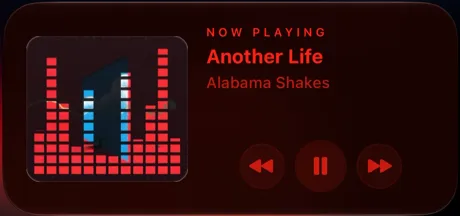
Apple Music has no visualizer on iPhone or iPad; only the Music app on Mac has one. Marquee’s Equalizer player style fills that gap by turning your album art into dancing equalizer bars while your music plays. It’s one of eight player styles in Marquee, a free Apple Music player for iPhone and iPad, and it’s part of Marquee Pro.
Does Apple Music have a visualizer?
Only on the Mac. The Music app on macOS still has a Visualizer in its Window menu, but the Music app on iPhone and iPad has never had one. Now Playing shows your album art, with lyrics and the queue a tap away, but nothing that moves with the music.
Third-party players can add one. Marquee plays your Apple Music library and the full catalog, with nothing to import, and its Equalizer style is the visualizer the iPhone app doesn’t have.
Your album art as equalizer bars
The Equalizer style slices your album artwork into 24 columns of blocks that rise and fall like the meters on a hi-fi graphic equalizer. The bars are made of the artwork itself, with a faint ghost of the full cover behind them, so every album gets its own colors. A soft glow in your theme’s accent color traces the tops of the bars.
Pause the song and the bars fall back to the floor; press play and they swell back up. Tap the artwork to play or pause. On iPad, the bars sit beside the controls in landscape, like all eight of Marquee’s player styles.
An animation, not an audio meter
Apple doesn’t let third-party apps read the audio of Apple Music songs, so no iPhone app can draw a true audio-reactive visualizer for Apple Music. Marquee’s bars are a choreographed animation instead: each column moves on its own rhythm while your music plays and settles when it stops. If you turn on Reduce Motion, the Equalizer style shows your artwork still.
An equalizer widget for your home screen
The Equalizer widget puts the same dancing album art on your home screen. It animates only while music plays, and the medium and larger sizes add previous, play/pause, and next buttons. The animation is drawn by the same system mechanism that renders the Home Screen clock, so it won’t drain your battery. It comes in every size, including extra-large on iOS 27. See the whole set on the animated music widgets page.
Share an equalizer video
Tap the share button in the player and Marquee turns the current song into a story-ready video of your artwork as equalizer bars, with the song title and artist. The video is silent, because Apple Music audio can’t be exported, so add the song with Instagram’s music sticker. It goes to the share sheet, so it works with Instagram Stories and any app that accepts video. Sharing is free.
How to turn on the Equalizer player
- Download Marquee free from the App Store and allow access to Apple Music.
- Go to the Customize tab and pick the Equalizer player style. Styles beyond Classic are part of Marquee Pro, which starts with a free trial.
- Play something and open Now Playing to watch your album art dance.

Try it with Marquee — free
The Apple Music player with eight player styles, animated widgets, themes, and Last.fm scrobbling. Requires an Apple Music subscription.
Frequently asked questions
Does Apple Music have a visualizer on iPhone?
No. Only the Music app on Mac has a built-in Visualizer. On iPhone and iPad, Marquee’s Equalizer player style turns your album art into dancing equalizer bars instead.
Do the equalizer bars react to the music?
Not to the audio itself. Apple doesn’t let third-party apps read Apple Music audio, so the bars are an animation that runs while your music plays and falls still when you pause.
Is Marquee’s Equalizer an audio equalizer?
No. Marquee’s Equalizer is a visual player style and doesn’t change how your music sounds. To adjust Apple Music’s sound on iPhone, open Settings, tap Apps, then Music, and choose an EQ preset such as Bass Booster or Late Night.
Is the Equalizer style free?
The Classic player is free. Equalizer and the other player styles — Full-Screen, Vinyl, Cassette, CD, Marquee, and Retro — are part of Marquee Pro, which you can try free. Sharing an equalizer video is free.
Does the Equalizer style work on iPad?
Yes. All eight player styles, including Equalizer, have landscape layouts on iPad.