Disco Ball: Your Album Art on a Spinning Mirror Ball
Updated October 31, 2026 · Marquee Features
In short
Disco Ball is a player style in Marquee, a free music player for iPhone and iPad. It wraps your album art around a mirror ball that turns under a spotlight while your music plays, with a matching animated Home Screen widget and a story video for sharing. It works with Apple Music and your own music files, and it’s part of Marquee Pro.
Your album art on a mirror ball
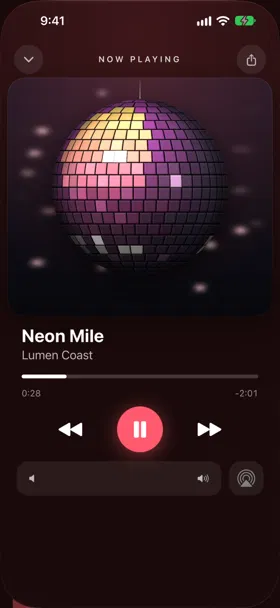
Disco Ball takes the cover of whatever’s playing and wraps it around a mirror ball, so every album throws its own colors. The ball hangs in a room drawn in your Marquee theme, with a spotlight in your theme’s accent color and the song title and artist in matching type.
Press play and the ball starts to turn, one slow revolution every 12 seconds. Pause and it stops where it is. Tap the ball to play or pause.
A disco ball widget for your Home Screen
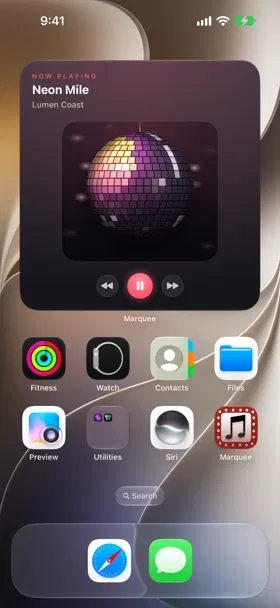
The Disco Ball widget puts the same mirror ball on your Home Screen. It spins while your music plays and stops when you pause, and the medium and larger sizes add previous, play/pause, and next buttons. It comes in small, medium, and large, plus extra large on iPad. It joins Marquee’s other animated widgets, and if you turn on Reduce Motion it stays still.
Share a spinning disco ball video
Tap the share button in the player and Marquee turns the current song into a story-ready video of your album art spinning on the mirror ball. It goes to the share sheet, so it works with Instagram Stories and any app that takes video. The video is silent, so add the song with Instagram’s music sticker.
On iPad and iPhone Duo
On iPad, Disco Ball has its own landscape layout, with the ball beside the controls, like all nine of Marquee’s player styles. On iPhone Duo’s inner display, it stacks into a single column.
With Apple Music or your own files
Disco Ball plays anything Marquee plays: your Apple Music library and the full catalog, or your own MP3 and FLAC files with no subscription. If you turn on Reduce Motion, the ball stays still.
How to turn on the Disco Ball player
- Download Marquee free from the App Store, then connect Apple Music or import your own music files.
- Go to the Customize tab and pick the Disco Ball player style. Styles beyond Classic are part of Marquee Pro, which starts with a free trial.
- Play something and open Now Playing to watch the ball spin.

Try it with Marquee — free
The Apple Music player with nine player styles, animated widgets, themes, and Last.fm scrobbling. Requires an Apple Music subscription.
Frequently asked questions
Does the disco ball spin with the music?
It spins while your music plays, one turn every 12 seconds, and stops when you pause. It doesn’t react to the audio itself.
Is the Disco Ball style free?
The Classic player is free. Disco Ball and the other player styles — Full-Bleed, Vinyl, Equalizer, Cassette, CD, Marquee, and Retro — are part of Marquee Pro, which you can try free. The Disco Ball widget is part of Marquee Pro too.
Is there a disco ball widget?
Yes. The Disco Ball widget spins on your Home Screen while music plays and comes in small, medium, and large, plus extra large on iPad. Medium and larger sizes have playback controls.
Does Disco Ball work with my own music files?
Yes. Every player style works with Apple Music and with the MP3, FLAC, and other music files you import into Marquee.